Weather Routing
Weather Routing is a numerical procedure
to minimize the time necessary to sail a given leg. It
combines wind forecasts with boatspeed/windspeed
data (polar charts). It is a "brute force" calculation:
to find the best possible solution, times for millions
of tracks are calculated and compared.
Tracks in a tree
A track can be represented by a collection
of segments with constant courses C1, C2 ,...Ci. At each segment end point (
times T1,T2, ...Ti ) course may be changed. The set of
all possible tracks can be described in software by a
tree-like structure.
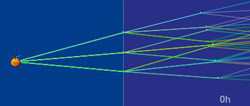 track tree (3 branches)
 |
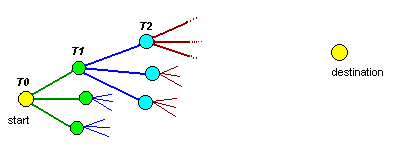 tree representing some
of the possible routes
tree representing some
of the possible routes |
The root node is the starting point (T0).
From the start, a number of branches (or track segments)
are added to the tree, pointing to different directions.
At T1 new branches are added to end of each
of the previous segments. Branching is done towards the
destination and branching cycles are repeated until the
destination is reached.
Pruning the tree
It's easy to see that all this branching
can quickly produce a large tree, difficult to work with.
The number of branches grows exponentially. If you test 5 courses at each node, the tree will have 5 branches
at T0, 25 in at T1, 125 in the T2 and so
on. At the end of 10 segments we will have nearly 10 million
tracks, too many even for a modern computer.
|
Fortunately there are ways to tame tree growing. This is done by pruning
the slow tracks, keeping only the ones that are real
candidates for best track.
Tracks that are in the wake of other
tracks are considered slow and are discarded (pruned). In the figure
to the right, the green
boat is leading. The blue
boat is behind, but not in the wake of the
green boat, so it is maintained. The red
boat, on the other hand, is in the wake of the green
boat and can removed.
|
 |
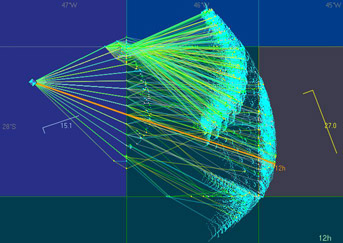 unpruned tree
|
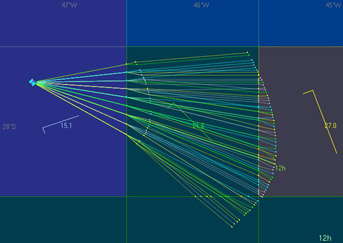
pruned
|
Isochrones
The set of points that can be reached
at a certain time is called "isochrone" (same time).
Plotting isochrones in the chart is a great way to figure
the best strategy. The vrtool weather
routing algorithm looks like this:
- Add new branches to the tree until next isochrone
is reached
- Sort tracks using distance to destination as key.
This produces de list of best tracks up to the moment
(best on top).
- Prune slow tracks.
- Repeat steps 1,2,3 until destination is reached
(or until the final isochrone is reached)
Action points
Action points are points where we have to
adjust the boat course. Of course this can be done at
any time, but the route optimizer uses the following action points:
|

|
1- Points
where the course crosses the wind grid. This is
the nearest point of either the vertical longitude
line or horizontal latitude line ( like point 1
in the figure to the left).
This is used for Virtual Regatta games, where wind changes at degree boundaries. VORG game uses continuous winds, so degree boundaries are not action points. |

|
2- Points
that are on the next isochrone (point 3 in the figure
to the left). Wind change points are action points.
|
Using vrtool weather routing module
|
To open the weather routing module, use menu option
>Tracks>Weather routing (or type Ctrl-W)
1. Set start and destination
positions (either by typing lat/lon or pointing
in the chart)
2. Check [x]Auto prune checkbox.
This must stay checked to automatically remove
slow tracks on each round (uncheck only for localized
experiments).
3. set # of tree branches:
If this number
is too small, you may not get the optimal solution
because optimal wind angles may be not used. If
the number is too large, the tree will grow too
fast and blow out of control.
There is a 2 million points maximum
limit for the tree. If this number is reached,
calculation is interrupted.
4. max angle to destination
is the maximum acceptable angle between the track
segment and the destination direction. If the segment
points away from the destination more than the specified
angle, then the segment is discarded. (default=60
deg) |

|
5. set "up to isochrone"
: Use this if you want to limit the number of calculated
isochrones.
Use 0 to calculate the whole leg. Default=72h
6. set "isochrone interval":
use 1 or 3 h (default=1h)
7. Wake angle - Used for pruning
(default = 45 degrees)
8. Click [Build track tree] - This
will start the calculation of the tree. This may take
a long time, particularly if config parameters are set
too aggressively. So take care when messing with config.
WR configuration - Read this post
Results- The results can be added
to current vrtool desktop. Use the buttons:
[Add best track] - This will add
the best track to vrtool desktop, named "WR_best".
The best track is:
-
if a final isochrone was especified
and destination was not reached, the best track is
the closest to destination (great circle distance).
-
if destination was reached, the best
leg is the one with smallest tracktime.
[Add isochrones] - this will add
the isochrones to vrtool desktop. The isochrone is a collection
of points, not a line. The point closest to the destination
in each isochrone is marked with the isochrone time (6h,
12h etc in small font). Note that the best track for one
isochrone is probably not the same in the next isochrone,
so don't try to connect the points..
[Add "some" tracks] - This
will add a number of tracks to the desktop. This may be
a large number of tracks. The top ten tracks are
always added. If there are too many, a maximum of 400
tracks are added (selected in a random fashion).
There is a button to [Clear WR tracks],
which will delete all tracks starting with 'WR'
in the desktop (i.e. weather routing generated tracks).
If you want to keep the best track, rename it before using
this button.
nov09:om: released
mar12: om: updated
©Copr 2008-2012 Omar F. Reis